

Microsoft Tightens Exchange Online Outbound Email Limits – What Businesses Need to Know
Updated September 2026
Microsoft has started rolling out stricter outbound email limits for new Exchange Online tenants. From September 14, 2026, Microsoft is changing how the Tenant External Recipient Rate Limit (TERRL) is calculated for certain tenants.
The change is particularly important for new Microsoft 365 environments — and for businesses using Exchange Online to send automated or application-generated email.
What is TERRL?
TERRL stands for Tenant External Recipient Rate Limit. It determines how many external recipients an Exchange Online tenant can send email to within a rolling 24-hour period.
An external recipient is an email address outside the accepted domains configured in your Microsoft 365 tenant. The limit applies across the tenant — not just to one individual mailbox.
New Exchange Online limits for new tenants
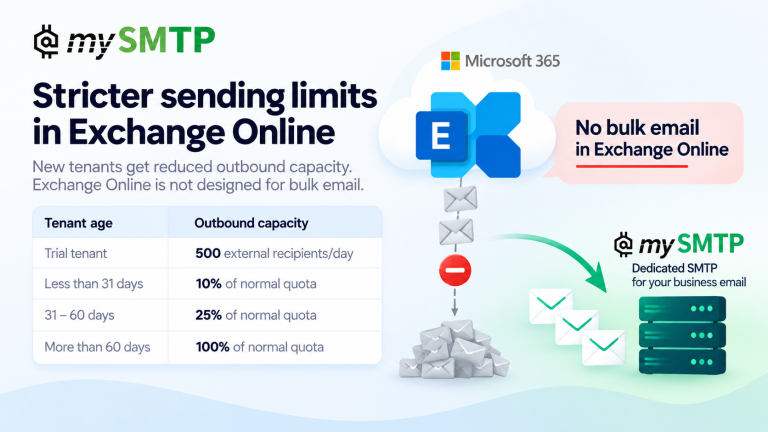
Microsoft is now applying significantly reduced outbound capacity while a new tenant builds history.
|
Tenant age |
Available TERRL quota |
|
Less than 31 days |
10% of standard calculated quota |
|
31–60 days |
25% of standard calculated quota |
|
More than 60 days |
100% of standard calculated quota |
|
Trial tenant |
500 external recipients/day |
This means a newly created Microsoft 365 tenant can have substantially less outbound capacity than an established tenant with the same number of licenses.
Read Microsoft’s Exchange Team announcement about TERRL.
Exchange Online is not designed for bulk email
This is perhaps the most important part of Microsoft’s announcement.
Microsoft explicitly states that, apart from its dedicated High Volume Email offering, Exchange Online does not support bulk or high-volume email.
Microsoft 365 and Exchange Online are excellent platforms for normal employee-to-employee and business communication. But they are not designed to be general-purpose outbound email infrastructure for applications and automated systems.
This isn’t only about newsletters
When people hear “sending limits”, they often think about email marketing. But automated business email can generate substantial volumes too.
- Webshop order confirmations
- Invoices and accounting emails
- Password resets
- SaaS notifications
- ERP and CRM systems
- Monitoring alerts
- Support systems
- Printers and scanners
- IoT devices
- Application-generated notifications
Individually, these systems may not appear to send much email. Together, however, they can generate thousands of external recipients — and they may all be consuming the same tenant-level allowance.
What happens when you reach the limit?
Once a tenant exceeds its Tenant External Recipient Rate Limit, Exchange Online can block further outbound email to external recipients.
A delayed newsletter is inconvenient. A delayed password reset, invoice, order confirmation or critical system notification can directly affect customers and business operations.
This is why transactional and automated email deserves infrastructure designed specifically for machine-generated email.
Microsoft 365 vs dedicated SMTP
There is a fundamental difference between an employee mailbox and an SMTP delivery service.
Exchange Online
Designed primarily for human business communication through Microsoft 365.
Dedicated SMTP
Designed specifically for applications, websites, devices and systems that need to send email reliably.
Microsoft 365 can handle your employees’ email. A dedicated SMTP service can handle your applications and automated email.
Dedicated SMTP with your own IP
mySMTP provides SMTP infrastructure specifically for business, transactional and application email.
With mySMTP you can send automated email using a dedicated sending IP, rather than relying on Exchange Online as an application mail server. Dedicated IP plans start from 5,000 emails per month.
Typical use cases include webshops, SaaS, ERP, accounting, CRM, password resets, invoices, IoT, printers, scanners and monitoring systems.
Dedicated mySMTP infrastructure supports proper SPF, DKIM, DMARC and reverse DNS (rDNS), helping establish a clear sending identity and giving you control over your own sender reputation.
See mySMTP dedicated SMTP plans →
Check your email setup for free
Before moving automated email to dedicated SMTP, check your sending domain and email authentication. The mySMTP Deliverability Toolbox provides free tools for checking email infrastructure and deliverability settings.
- Check SPF configuration
- Check DKIM configuration
- Check DMARC configuration
- Review DNS and sending-domain configuration
- Test and troubleshoot SMTP and deliverability issues
Open the free Email Deliverability Toolbox →
Your email. Your IP. Your reputation.
If your business relies on automated email, separating application email from Microsoft 365 can give you clearer, purpose-built email infrastructure and control over your own sending reputation.
Instead of asking:
“How much email will Microsoft allow us to send?”
the better question may be:
“Should this email be going through an employee mailbox system at all?”
Explore dedicated SMTP from mySMTP →
Frequently Asked Questions
What is the Exchange Online Tenant External Recipient Rate Limit (TERRL)?
TERRL is a tenant-level Microsoft Exchange Online limit controlling how many external recipients a tenant can send email to within a rolling 24-hour period.
What is the TERRL limit for a new Microsoft 365 tenant?
For tenants less than 31 days old, Microsoft applies 10% of the standard calculated quota. From 31 to 60 days, 25% applies. After 60 days, the full calculated quota applies. Trial tenants are limited to 500 external recipients per day.
Is Exchange Online designed for bulk email?
No. Microsoft states that Exchange Online, apart from its separate High Volume Email offering, does not support bulk or high-volume email.
Can I use dedicated SMTP for Microsoft 365 applications and automated email?
Yes. Applications, webshops, ERP systems, accounting platforms, printers, scanners, IoT systems and other services that support standard SMTP can use a dedicated SMTP relay instead of Exchange Online for automated outbound email.
Why use a dedicated IP for SMTP?
A dedicated IP is used only by your organization, so your IP reputation is not directly shared with unrelated senders. Authentication, sending behaviour, list quality, complaint rates and proper IP warm-up still matter for deliverability.