

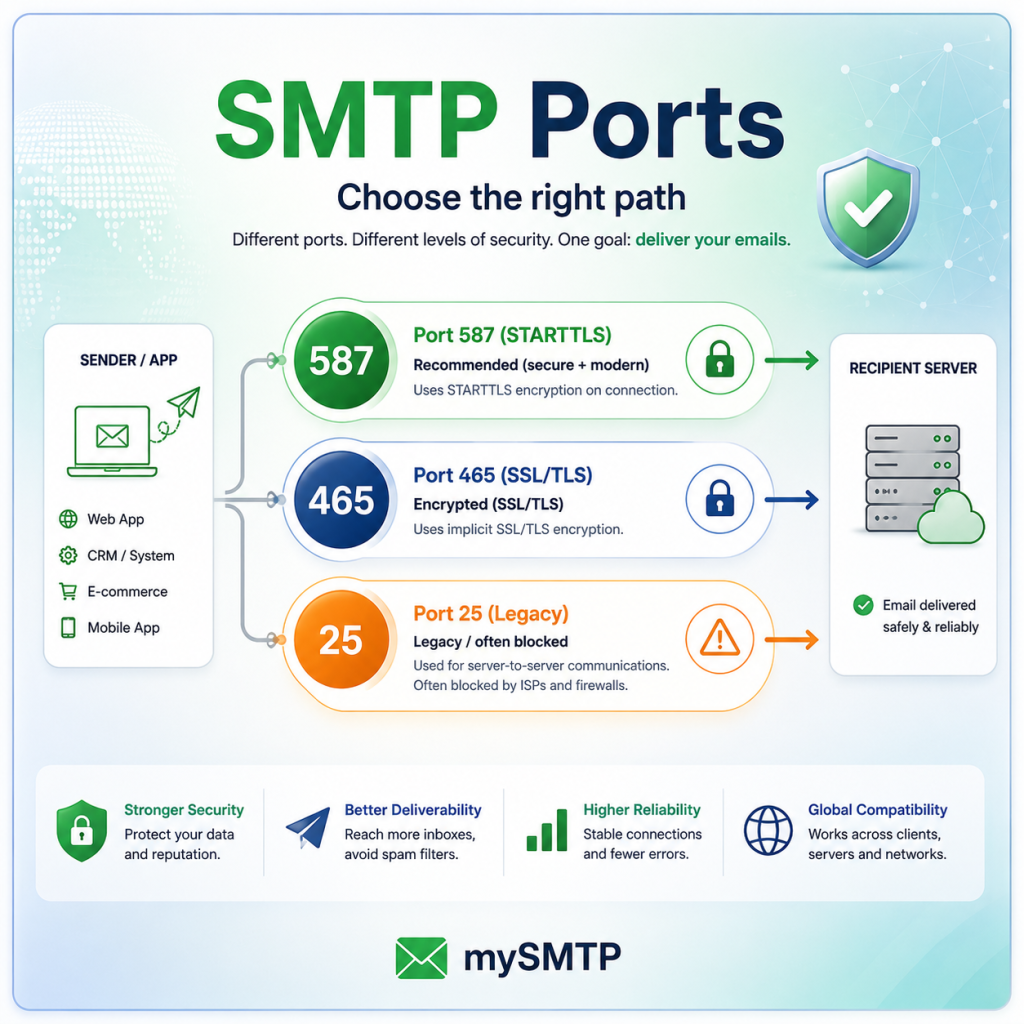
Every email you send exits your application or mail server through a TCP port — a numbered "door" in the network through which data flows. For email specifically, there are four ports that matter: 25, 465, 587, and 2525. Each has a distinct history, a specific intended use case, and a very different relationship with security and deliverability. Yet most developers and email marketers treat them as interchangeable, picking whichever one works first and never revisiting the choice.
That's a mistake. The port you submit mail on affects whether your messages get through at all, whether they're encrypted in transit, and how your sending infrastructure is perceived by mailbox providers and spam filters. This guide explains everything you need to know — from the underlying protocols to the pragmatic decision of which port to use in your specific setup.
How SMTP Ports Evolved - And Why It Still Matters
Understanding why four different ports exist requires a quick look at how email infrastructure evolved. SMTP — Simple Mail Transfer Protocol — was defined in 1982 by Jon Postel in RFC 821. At the time, the internet was a trusted academic network and security was not a concern. Port 25 was assigned as the universal SMTP port, used for all mail exchange between servers.
As the internet grew and spam became a crisis, the clean original architecture fractured. ISPs began blocking port 25 on residential and business connections to prevent compromised machines from sending spam directly to the world. Alternative ports were introduced, deprecated, and revised by standards bodies over the following decades. The result is the slightly messy landscape we have today: four ports, each with its own story.
Port 25 — The Original, RFC 821
SMTP is defined. Port 25 handles all mail transfer: server-to-server delivery and client submission. There is no encryption. The internet is trusted. This works fine for about a decade.
Port 465 — SSL Wrapping (Short-Lived Standard)
IANA assigns port 465 for "SMTPS" — SMTP wrapped in SSL, similar to how HTTPS wraps HTTP. It gains traction quickly. Then, just a few months later, IETF revokes the assignment in favour of a different approach (STARTTLS on port 587). Port 465 is left in a grey zone, widely used despite being technically unassigned for this purpose for over a decade.
Port 587 — The Modern Submission Port, RFC 2476
RFC 2476 introduces a formal distinction between mail submission (client to server) and mail transfer (server to server). Port 587 is designated for submission, with STARTTLS used to upgrade the connection to TLS. This is now the canonical port for authenticated email submission and is what virtually all modern email clients and ESPs support.
Port 465 — Rehabilitated by RFC 8314
After twenty years of ambiguity, RFC 8314 officially recommends port 465 for implicit TLS submission (TLS from the very first byte). This resolves the long-standing confusion and formally validates what many providers had been doing in practice for years.
Port 2525 — The ISP Workaround
Not an IANA-assigned standard, but widely adopted as an alternative submission port for situations where port 587 is blocked by a network administrator, firewall, or cloud hosting provider. Functionally identical to 587 in most implementations — it's an escape hatch, not an upgrade.
Port-by-Port Breakdown
Here is a direct comparison of all four ports across every dimension that matters for deliverability and infrastructure decisions.
| Port | Common Name | Use Case | Encryption | ISP Blocking | Status |
|---|---|---|---|---|---|
| 25 | SMTP | Server-to-server (MTA relay) | STARTTLS (optional) | Almost universal | MTA only |
| 465 | SMTPS / Implicit TLS | Client-to-server submission | Implicit TLS (always on) | Rarely blocked | Recommended (RFC 8314) |
| 587 | Submission | Client-to-server submission | STARTTLS (mandatory) | Rarely blocked | Recommended (RFC 6409) |
| 2525 | Alternate Submission | Fallback when 587 is blocked | STARTTLS (varies) | Sometimes blocked | Non-standard, pragmatic |
The short answer: Use port 587 for sending email from applications, email clients, and marketing platforms. Use port 465 if your library or environment supports implicit TLS natively. Avoid port 25 for submission. Use port 2525 only if 587 is blocked and you have no other choice.
Encryption Models: STARTTLS vs. Implicit TLS
The most technically significant difference between ports isn't the port number itself — it's the encryption model. Ports 587 and 2525 use STARTTLS; port 465 uses Implicit TLS. These are fundamentally different approaches to securing the connection between your mail client and the SMTP relay, and the difference has real security implications.
⬆️ STARTTLS (Opportunistic)
The connection starts unencrypted on a plain TCP socket. The client then sends a STARTTLS command to upgrade the connection to TLS. This means there is a brief unencrypted window before the handshake, and — critically — a misconfigured client can be downgraded to sending plaintext if STARTTLS negotiation fails silently.
🔒 Implicit TLS (Always-On)
The TLS handshake happens before any SMTP data is exchanged. There is no plaintext window, no negotiation, no opportunity to downgrade. The connection is encrypted from the very first byte. This is the model used on port 465 and is generally considered the more secure option for modern deployments.
🚫 No Encryption (Legacy)
Plain SMTP on port 25, common in older or misconfigured server-to-server transfers. All message content, headers, and authentication credentials travel in plaintext. Entirely unacceptable for any user-facing submission path, and increasingly flagged by mailbox providers as a trust signal.
🔁 STARTTLS with Enforcement
A hardened variant where the client refuses to proceed if STARTTLS fails. This eliminates the downgrade risk of opportunistic STARTTLS and is how well-configured port 587 deployments should behave. Most modern SMTP libraries (Nodemailer, SwiftMailer, Python's smtplib) support this mode.
Watch out for silent STARTTLS downgrades: If your SMTP library is configured to use STARTTLS but the relay doesn't offer it, some libraries will fall back to sending in plaintext — including your credentials — without throwing an error. Always set your library to require TLS rather than merely prefer it. In Python's smtplib, use SMTP_SSL for port 465 or call starttls() and check the return code explicitly for port 587.
Port 25: Why It's Blocked Almost Everywhere — And What That Means
Port 25 deserves special attention because it is simultaneously the most important port in the email ecosystem and the most restricted. Server-to-server mail delivery — the final hop from your ESP's infrastructure to Gmail's or Outlook's incoming mail servers — always uses port 25. You cannot change this. The MX records for every receiving mail server point to a host that listens on port 25.
What you can control is whether your application submits mail to a relay using port 25. You should not. Here's why:
Major cloud platforms including AWS EC2, Google Cloud, and Azure all block outbound port 25 by default on new accounts. AWS requires a formal support request to lift the restriction, and even then only grants it for specific use cases. This means that if you spin up a VPS and try to send email directly on port 25, your messages will either be silently dropped or you'll receive a TCP connection timeout before even reaching the target mail server.
The reason is anti-spam. Port 25 has been a primary vector for botnets and compromised machines blasting spam directly to the world's mail servers. Blocking it at the network edge removes this threat at the source. It has worked — but it also means that anyone building legitimate email infrastructure needs to submit through an authenticated relay on port 587 or 465, not send directly on port 25.
Port 25 is for MTA-to-MTA relay, not submission. When mySMTP delivers your email to Gmail's mail servers, it uses port 25 on the final hop — and that's correct. But the connection between your application and mySMTP's relay should always be port 587 or 465, authenticated and encrypted.
How Port Usage Has Shifted Over Time
Adoption of the "correct" submission ports has grown steadily as security awareness increased and old habits were replaced by better defaults in libraries and ESP documentation. The canvas chart below shows the estimated global share of authenticated SMTP submission traffic across the major ports over the past decade.
Authenticated Submission Port Usage Share (2015 – 2025)
Estimated share of client-to-relay SMTP submission traffic by port. Server-to-server port 25 traffic excluded. Source: industry ESP infrastructure surveys and IETF operational data.
Choosing the Right Port: A Decision Guide
The choice of port depends on three factors: who you are (application developer, email marketer, sysadmin), what you're connecting to (an ESP relay, your own MTA, a cloud mail service), and what your network environment allows. The following breakdown covers the most common scenarios.
Scenario 1: Sending Transactional Email from an Application
Use port 587 with STARTTLS enforced as your first choice. It is the most universally supported port across all major SMTP relays and passes through virtually all firewalls. If your ESP or relay also supports port 465, prefer it if your language's SMTP library handles implicit TLS cleanly — Node.js's Nodemailer, for example, does this well with the secure: true flag.
Scenario 2: Sending Marketing Email via an ESP
Your ESP handles the port selection internally for delivery. What you control is the API or SMTP submission port your platform uses to hand off messages to the ESP's relay. Follow your ESP's documentation exactly — most will specify port 587 with authentication credentials. Port 2525 may be offered as a fallback if your hosting provider blocks 587.
Scenario 3: Running Your Own Mail Server
Your MTA (Postfix, Exim, Sendmail) needs port 25 open and listening to receive inbound mail from other servers. For outbound delivery, your MTA connects outbound on port 25 to remote MX hosts — this is non-negotiable. For user submission (clients connecting to your MTA to send), configure port 587 with SASL authentication and enforced STARTTLS, plus optionally port 465 with implicit TLS. Never open port 25 for unauthenticated submission from the internet.
Scenario 4: Locked-Down Cloud Environment (e.g., AWS, GCP)
If you cannot open port 587 (unusual but possible in very locked-down environments), fall back to port 2525, which most major ESP relays support as an alternative. Note that port 2525 is not an IANA standard and some firewalls or security scanners may flag it. Always confirm TLS support with your relay provider before relying on it for production traffic.
Diagnosing Port and Connection Issues
Port connectivity problems are among the most common causes of "email not sending" errors in application deployments. Before diving into logs and code, a quick network test can pinpoint whether you're dealing with a port block, a TLS misconfiguration, or a relay authentication failure.
Quick diagnostic using telnet or nc: Run telnet smtp.youresp.com 587 from your server. If you see a 220 banner, the port is reachable. No response or a timeout means the port is blocked at the network level — not an application problem. For TLS issues, use openssl s_client -connect smtp.youresp.com:465 to inspect the certificate chain directly.
| Error / Symptom | Likely Cause | Fix |
|---|---|---|
| Connection timed out on port 587 | Outbound port blocked by ISP or cloud firewall | Try port 2525; request port unblock from provider; use ESP's API instead |
535 Authentication failed |
Wrong credentials, or AUTH attempted before STARTTLS | Verify credentials; ensure TLS is established before AUTH; check for IP allowlist requirements |
421 Too many connections |
Connection pool too large; relay rate-limiting | Reduce concurrent connections; implement exponential backoff; use a dedicated IP if available |
| TLS certificate error | Expired cert on relay; mismatched hostname; self-signed cert | Verify cert validity with openssl s_client; ensure SNI hostname matches; update CA bundle |
| Messages sent but not encrypted | STARTTLS configured as optional; silent downgrade occurred | Set STARTTLS to required/enforced in library config; switch to port 465 for implicit TLS |
550 Relay not permitted |
Attempting to relay without authentication on port 25 | Use port 587/465 with AUTH credentials; never relay unauthenticated |
Port Choice and Deliverability: The Indirect Connection
Port selection doesn't directly influence spam scores or inbox placement — mailbox providers evaluate messages based on content, authentication (SPF, DKIM, DMARC), and sender reputation, not the submission port. However, port choice has two indirect deliverability implications that are worth understanding.
First, unauthenticated relay on port 25 is a red flag. If your server is configured to accept and forward mail on port 25 without authentication, you are running an open relay — one of the fastest ways to get your IP address listed in every major blacklist within hours. Open relays are actively scanned for and exploited. The authentication requirement on ports 587 and 465 is as much about protecting your sending reputation as it is about security.
Second, encryption signals trust. While mailbox providers don't currently penalise senders for transmitting in plaintext on the submission hop, MTA-to-MTA encryption via STARTTLS on port 25 is becoming a baseline expectation. Google's Transparency Report shows the percentage of Gmail traffic sent over encrypted connections, and senders whose mail arrives without TLS are increasingly deprioritised in quality scoring models. Ensuring the full chain — submission to relay to destination — uses TLS is good hygiene that compounds over time.
Inbound Email Encryption Rate at Major Mailbox Providers (2025)
Percentage of inbound SMTP connections that use TLS encryption on the server-to-server delivery hop. Sources: Google Transparency Report, M3AAWG operational data.
The takeaway from these numbers: if your email is landing in the 13% of unencrypted traffic, you're at risk of losing deliverability. Modern mail infrastructure is overwhelmingly encrypted, and ensuring your stack — from submission port to relay to delivery — uses TLS throughout is no longer optional. It's the baseline expectation.
The bottom line on port selection: Use port 587 with enforced STARTTLS for maximum compatibility. Use port 465 with implicit TLS if your stack supports it cleanly — it's slightly more secure by design. Treat port 2525 as a network-constraint fallback, not a preference. Never use port 25 for submission from applications or clients.
Ready to Send on the Right Port?
mySMTP's relay supports ports 587 and 465 with full TLS, SPF, DKIM, and DMARC compliance out of the box. Get your SMTP credentials and start sending in minutes.
Get SMTP Credentials →